Puck-Style vs. Watch-Sized: Deciding on Your First Entry-Level Dive Computer

Introduction: Your First Digital Dive Buddy
For most new divers, the "Open Water" course involves using whatever equipment the dive center provides. Usually, this means a rental dive computer that has seen hundreds of students and features a scratched screen and a salty strap. However, as you move toward your first 50 dives, the transition from rental gear to personal ownership is a major milestone. Owning your computer means you know its history, you trust its battery, and most importantly, you are intimately familiar with its interface.
When you start shopping, you will immediately notice two primary form factors: the Puck-style and the Watch-sized computer. While both perform the same life-sustaining calculations, they offer vastly different user experiences. The "best" computer isn't necessarily the most expensive one; it is the one that matches your specific diving goals, whether that is local cold-water exploration or tropical holiday diving.
Before diving into the hardware, remember that a computer is only as good as the diver’s ability to interpret it. If you haven't already, take a moment to review Dive Computer Demystified: A Beginner’s Guide to Understanding Your Data to ensure you know exactly what those flashing numbers mean for your safety.
The Puck-Style Computer: The Rugged Workhorse
The puck-style computer is the quintessential entry-level device. Named for its resemblance to a hockey puck, these units are characterized by a large diameter, high-contrast LCD screen, and a robust, no-nonsense build. Models like the Mares Puck Pro or the Cressi Leonardo have been staples in the industry for decades.
Pros of the Puck
The primary advantage of a puck-style computer is exceptional readability. Because the housing is large, the manufacturer can dedicate significant screen real estate to your most critical data: current depth and No Decompression Limit (NDL). For a beginner diver dealing with the "task loading" of buoyancy control and navigation, having giant digits that are visible from two feet away is a massive safety benefit.
Furthermore, pucks are generally the most budget-friendly option and often feature user-replaceable batteries. This means you can swap a CR2450 battery in the middle of a remote dive trip without needing a specialized service center.
Cons of the Puck
The downside is purely ergonomic. These units are bulky. They are designed to be worn over a wetsuit or drysuit, and they look conspicuously out of place at a post-dive dinner. You cannot wear a puck-style computer as a daily timepiece. Additionally, many entry-level pucks utilize a single-button interface, which can be unintuitive for some users.
Ideal for: Budget-conscious beginners, local divers in low-visibility conditions, and anyone who prefers a "tool" over a "gadget."

The Watch-Sized Computer: Sleek Versatility
In recent years, the industry has shifted toward watch-sized computers. These devices, such as the Suunto D4i Novo or the Garmin Descent G1, pack the same decompression algorithms into a frame no larger than a standard sports watch.
Pros of the Watch-Sized Style
The most obvious benefit is wearability. You can put your computer on in the morning, wear it on the boat, through your dives, and out to the bar in the evening. For the traveling diver, this is one less piece of bulky gear to pack. Modern watch-sized computers also tend to feature higher-resolution screens (often LED or high-end Matrix LCDs) and multi-button interfaces that make navigating menus significantly faster. Some even include advanced features like heart rate monitoring or GPS surface marking.
Cons of the Watch-Sized Style
The trade-off for that sleek profile is screen size. The text is inevitably smaller, which can be a challenge in dark water or for divers who require reading glasses. They are also more expensive—often double the price of a puck. Finally, many watch-style computers require professional battery service or frequent recharging, which adds a layer of maintenance to your gear kit.
Ideal for: Divers who want a "one-and-done" device for travel and daily life, and those who prefer a more modern, interface-driven experience.
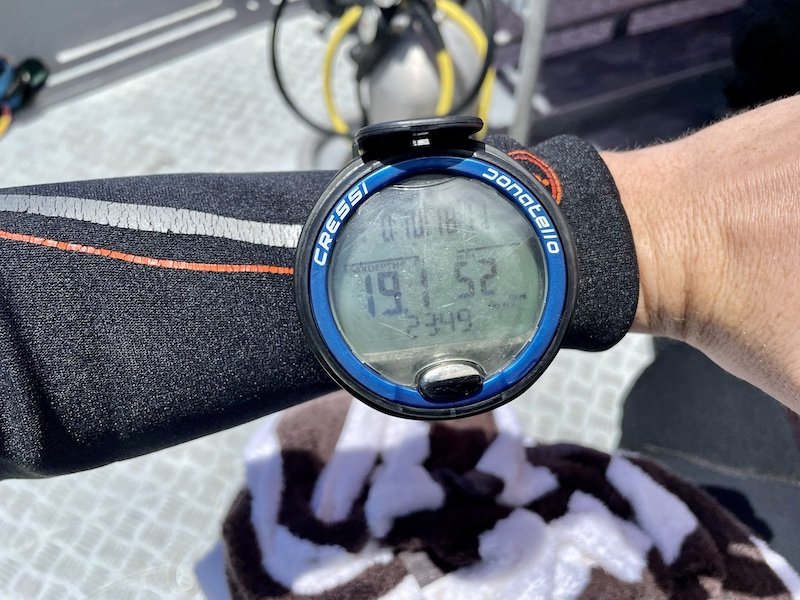
Readability and Display: Size vs. Resolution
When you are 20 meters (66 feet) deep, your ability to process information quickly is vital. This is where the battle between size and resolution happens.
Puck-style computers typically use segmented LCD screens. These are the "old school" digital displays where numbers are formed by fixed segments. While they aren't "pretty," they offer incredible contrast. In murky green water or silty conditions, a large segmented "15" for your NDL is much easier to read than a tiny, high-resolution color icon.
Conversely, watch-sized computers often use matrix displays or color LED screens. These allow for more complex data presentation, such as graphical ascent rate meters and color-coded warnings (green for safe, yellow for caution, red for danger).
Pro Tip: If you frequently dive in low-light environments or use a thick 7mm hood that limits your peripheral vision, the larger digits of a puck-style computer are almost always the safer choice.
To understand why these numbers are so critical to your safety, refer back to Dive Computer Demystified: A Beginner's Guide to Key Metrics.